2025/01/10

Check Points in Machine Learning

Q: What is the check point in machine learning & deep learning?

A: It is used to preserve the temporary models during training.

With the development of large language models (LLMs), models are becoming increasingly larger. As a result, research on utilizing model checkpoints has become important. Some machine learning experts are investigating methods to resume checkpoint models from interrupted training progress.

Checkpoint (檢查站/關口)在深度學習的領域,是指訓練過程中所保存的模型。

隨著大型語言模型(Large Language Model, LLM)的發展,現在的模型越來越大,因此Checkpoint的保留有其重要性,有學者在研究訓練中斷後如何重新從Checkpoint繼續先前未完成的訓練。


References:

Machine Learning Checkpoinging (deepchecks)

Resume Training from Checkpoint Network (Matlab)

Rojas, E., Kahira, A. N., Meneses, E., Gomez, L. B., & Badia, R. M. (2020). A study of checkpointing in large scale training of deep neural networks. arXiv preprint arXiv:2012.00825.

Xiang, L., Lu, X., Zhang, R., & Hu, Z. (2024, May). SSDC: A Scalable Sparse Differential Checkpoint for Large-scale Deep Recommendation Models. In 2024 IEEE International Symposium on Circuits and Systems (ISCAS) (pp. 1-5). IEEE.

2024/07/24

ChatGPT「雞兔同籠」解題

李宏毅老師的「80分鐘快速了解大型語言模型」課程影片中,示範了ChatGPT可以用來解「雞兔同籠」,於是來試試問它公元四世紀、1600年前的題目:


結果真的回答出來了!

參考資料:

80分鐘快速了解大型語言模型(1:04:05處)
【校園冷知識13】經典的「雞兔同籠」,原來是這個朝代的數學題!(親子天下)

2022/07/12

LaTex: Bibliography styles - IEEE, APA

 This post shows how to configure the bibliography style.

\documentclass{article}

\begin{document}


\textbf{Style: plain}


Deep learning is very important \cite{DL_book_goodfellow2016}.


\bibliographystyle{plain} 

\bibliography{my_bib}

\end{document}


Plain - plain


IEEE - ieeetr

ACE - acm

APA - apalike


APA - apalike + natbib

\documentclass{article}

\usepackage[square]{natbib}

\begin{document}


\textbf{Style: apalike natbib}


Deep learning is very important \cite{DL_book_goodfellow2016}.


\bibliographystyle{apalike} 


\bibliography{my_bib}

\end{document}


\documentclass{article}

\usepackage{natbib}

\begin{document}


\textbf{Style: apalike natbib}


\cite{DL_book_goodfellow2016} is a textbook in deep learning.


Deep learning is very important \citep{DL_book_goodfellow2016}.


Citation format citeauthor \citeauthor{DL_book_goodfellow2016}.


Citation format cite \cite{DL_HA_review_wang2017}.


Citation format citet \citet{DL_HA_review_wang2017}.


Citation format citep \citep{DL_HA_review_wang2017}.


\bibliographystyle{apalike} 


\bibliography{my_bib}

\end{document}


Result:


Reference:

2022/06/12

Arduino: Hello World for WeMos D1 WIFI UNO

 Here are the steps for the WeMos D1 WIFI UNO:


1.  Select File -> Preferences


2.  Settings -> Additional Boards Manager URLs: 

http://arduino.esp8266.com/stable/package_esp8266com_index.json


3. Tools -> Board: "Arduino Uno" -> Boards Manager

4. Enter WeMos and select Install for ESP8266.


5. Select "LOLIN(WeMos) D1 R1


6. Select COM port


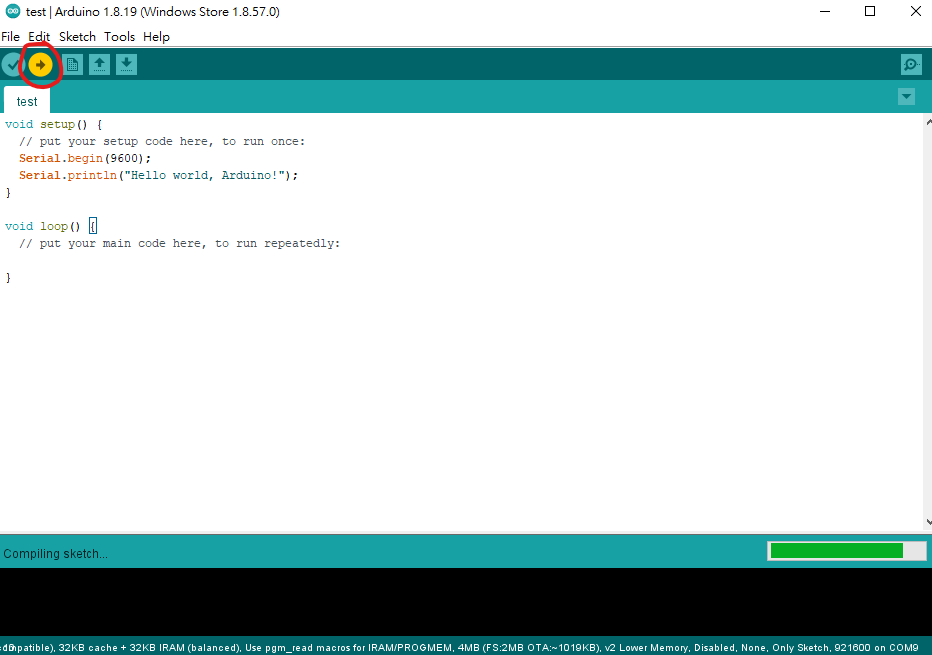
7. Write the simple code below and select the arrow to download

void setup() {
  // put your setup code here, to run once:
  Serial.begin(9600);
  Serial.println("Hello world, Arduino!");
}

void loop() {
  // put your main code here, to run repeatedly:
  
}


8. Select the Serial Monitor


9. You may see strange characters after you press the reset button.


10. Move the print line function into the loop. The strange characters only happen after pressing the reset button. So you may ignore them.

void setup() {
  // put your setup code here, to run once:
  Serial.begin(9600);

}

void loop() {
  // put your main code here, to run repeatedly:
  Serial.println("Hello world, Arduino!");  
  delay(1000);
}
 

Related information: 

2022/06/09

How to change the TeXShop spell check dictionary to American English?

TeXShop is a popular LaTex editor for macOS. If the spell check goes to the British English, you may see something like this:


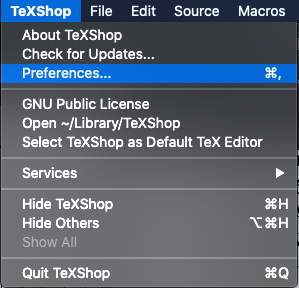
To change the dictionary, go to TeXShop -> Preferences.


Select Source -> Dictionary.


Select 'en' for American English. 


If it is already 'en', try select another option and quit TeXShop. Restart TeXShop again after you select 'en'. 

Final result:

Reference:

How to Change TeXShop dictionary to American English? (StackExchange) (The answers were a bit outdated.)

2022/05/02

Computational speed for PyTorch tensors using cuda().squeeze() and squeeze().cuda()

I am wondering which of the following codes in PyTorch work faster:

my_tensor.cuda().squeeze() vs. my_tensor.squeeze().cuda()


Check with the code:

time_start_vocoder = time.perf_counter()          

a = my_tensor.cuda().squeeze()


time_elapsed_test = (time.perf_counter() - time_start_vocoder)

print('a time=',time_elapsed_test)


time_start_vocoder = time.perf_counter()


b = my_tensor.squeeze().cuda()


print('b time=',time_elapsed_test)

Where

my_tensor.shape = torch.Size([1, a_large_number])

Result:

Run 1:

a time= 0.00013689976185560226

b time= 9.429734200239182e-05


Run 2:

a time= 0.0001775706186890602

b time= 0.00010665040463209152


Run 3:

a time= 0.0001584356650710106

b time= 6.485264748334885e-05


Swap the order of a and b in code:


Run 1:

b time= 0.0001363120973110199

a time= 0.00011534709483385086


Run 2:

b time= 0.00021496228873729706

a time= 7.021520286798477e-05


Run 3:

b time= 0.00020176637917757034

a time= 6.876792758703232e-05


Conclusion:


The execution time for my_tensor.cuda().squeeze() and my_tensor.squeeze().cuda() are similar, and my_tensor.cuda().squeeze() might be a little bit faster.

2022/04/20

Pi (π) in Torch Tensor - torch.pi

There is no pi (π) function in PyTorch with some version, so some people suggested to use math.pi or np.pi for conversion into torch tensor. For me, torch.pi works with a notebook without the GPU, but not with a computer with the GPU.

Here is the code to compare different implementations of the Pi function.

import torch

import numpy as np

import time

import math


#test pi

time_start = time.perf_counter()

pi_math = torch.tensor(math.pi)

time_elapsed_test = (time.perf_counter() - time_start)

print('math pi time =',time_elapsed_test)


time_start = time.perf_counter()

pi_np = torch.tensor(np.pi)

time_elapsed_test = (time.perf_counter() - time_start)

print('np pi time =',time_elapsed_test)


time_start = time.perf_counter()

pi_torch = torch.pi

time_elapsed_test = (time.perf_counter() - time_start)

print('torch pi time =',time_elapsed_test)


time_start = time.perf_counter()

PI = torch.acos(torch.Tensor([-1]))

time_elapsed_test = (time.perf_counter() - time_start)

print('PI time =',time_elapsed_test)


Results for computation time:

math pi time = 3.6502000057225814e-05

np pi time = 1.9006000002264045e-05

torch pi time = 8.009999419300584e-07

PI time = 0.00035780000007434865


Hence torch.pi is the fastest.


Without torch.pi, you may use torch.tensor(np.pi)

For an accurate pi, cast the type to float64:

torch.tensor(np.pi, dtype=torch.float64)

Example:

(Pdb) torch.tensor(np.pi)*100000

tensor(314159.2812)

(Pdb) torch.tensor(np.pi, dtype=torch.float64)*100000

tensor(314159.2654, dtype=torch.float64)

MATLAB:

pi = 3.141592653589793

Reference:

Np.pi equivalent in Pytorch

Is there the Pi greek (3.1415…) defined somewhere?

2022/03/15

Python: Short-Time Fourier Transform (STFT) and its inverse transform (ISTFT) using librosa

Below shows an example using STFT to transform speech into the frequency domain and ISTFT to transform the spectral data back to waveforms in the time domain. The Librosa package is used.

import librosa

import soundfile as sf

x, sr = librosa.load('1.wav', sr=None)


n_fft = 256

hop_length = 128

win_length = 256


X = librosa.stft(x, n_fft=n_fft, hop_length=hop_length, win_length=win_length)


y = librosa.istft(X, n_fft=n_fft, hop_length=hop_length, win_length=win_length)


sf.write('1_istft.wav', y, 16000)

Results for x and y:


References:

Matlab: Short-Time Fourier Transform (STFT) and its inverse transform (ISTFT) (StudyEECC)

librosa.stft

librosa.istft

2022/03/10

Matlab: Short-Time Fourier Transform (STFT) and its inverse transform (ISTFT)

For sound processing in realtime scenarios, it is not possible to wait for a complete sound file. In this case, short-time processing is important.

Here is an example using STFT to transform speech into the frequency domain and inverse transform the spectral data back to waveforms in the time domain:


[S,F,T] = stft(x, fs,'Window',win2,'OverlapLength',128,'FFTLength',256); 

[y,ti] = istft(S,fs,'Window',win2,'OverlapLength',128,'FFTLength',256);

References:

stft - Short-time Fourier transform (MathWorks)

istft - Inverse short-time Fourier transform (MathWorks)

2022/03/09

Matlab: Discrete Cosine Transform (DCT) for speech processing

The DCT and inverse DCT may be used to convert a speech signal into the transform domain using real values and back to the speech waveform.

Example with Matlab:

%load speech

load mtlb

x = mtlb;

X = dct(x);

y = idct(X);

Results:


The values for x and y look the same, but MATLAB consider them as different.

>> isequal(x,y)

ans =

  logical

   0

For real-time processing, short-time DCT is required.

References:

Discrete Cosine Transform (Wikipedia)

dct (MathWorks)

2021/12/20

Math for Deep Learning: arg min

arg min f(x) = the value x with the minimum value of f(x)

這個arg min f(x)的意思是,當f(x)是最小值的時候,x的數值


e.g. 以下的例子

f(0) = 3

f(0.9) = 2.1

f(1) = 2

f(1.1) = 2.5

f(2) = 5

f(3) = 46

因為最小的f(x) = 2
則arg min f(x) = 1

Reference:

Explanation on arg min

2021/08/31

Spyder: Show Numpy array in variable explorer

By default, Spyder does not show some Numpy arrays in variable explorer.

To show them, simply unselect "Exclude all-uppercase references".

Reference:

why converted numpy array is NOT showing in the variable exloporer in Spyder 4? (StackOverflow)

2021/08/26

Deep Learning: threshold θ and bias b

The output y of a single-node neural network can be represented as:

y = a(Σwixi - θ)

where a is the activation function, xi is the ith input, wis the ith weight, and θ is the threshold.

When the summation of wighted input Σwixi is less than θ, the neuron does not output. Hence we call θ the threshold, which is similar to the threshold potential in a physical neuron.

We may replace θ by -b and get

y = a(Σwixi + b)

where b is called the bias parameter.

So b = - θ is a more generalized representation for the threshold.

References:

A Beginner’s Guide to Neural Networks: Part Two

Hinton Neural Networks課程筆記2b:第一代神經網路之感知機

深度學習的數學:用數學開啟深度學習的大門(博碩) p.12-16

Audacity: Silence the selection of the sound track 將選取的一段音軌靜音

This is a function of Audacity.


To mute a selection in Audacity, simply click the button for 'Silence audio selection'.

Result:

Related Information:

Audacity: Change audio speed and keep the pitch of the talker unchanged (StudyEECC)

Audacity: Change the sample rate from 44.1 kHz to 16 kHz (StudyEECC)

2021/08/25

在LaTex使用中文 How to show Chinese characters in LaTex

對於LaTex新手來說,使用中文可能會遇到一點小麻煩,不過其實並不困難,只要使用CJK套件,然後在中文的部分載入bsmi(明體)或bkai(楷書)字體即可。本文以Mac TeXShop環境為例:

LaTex程式碼:

\documentclass{article}

\usepackage{CJKutf8}

\begin{document}


The blog `StudyEECC' (\begin{CJK}{UTF8}{bsmi}電機、電子、通訊、電腦資訊工程的學習筆記\end{CJK}) was started in August 2016.


\vspace{\baselineskip}

\begin{CJK}{UTF8}{bkai}已經5年了!\end{CJK}


\end{document}


輸入後:


\end{document}

按Typeset鍵,執行結果如下:


以上程式可在IEEE格式 \documentclass{IEEEtran} 中執行

參考資料:

LaTex 的中文設定(陳鍾誠的網站)

2021/08/09

This Study or Research? 談談「這個研究」

講到研究,很自然想到Research這個英文字,例如做研究- do research.

因此,在寫理工領域的英文paper、文章時,當我們想要說明「本研究」、「這個研究」時,很自然會想要寫 "this research"

然而,當你請以母語是英文的人來使用修改文章時,他們常會告訴您:research是複數型(但文法上是單數)。

這個時候,困擾就來了!我的「這一個研究」是單數,所以能用research這個字嗎?用study比較好? 

網路上寫說

If you find yourself writing "a research" or "in this research," change it to "a study" or "in this study."

我個人的理解是,如果是某個領域研究的統稱,包括了許多的studies,這種大範圍的研究集合起來可稱為research,例如人工智慧的研究,稱為artificial intelligence research,或AI research。

當然,我的研究也包含了不少東西,因此可以說my research,我的研究興趣則是my research interests

然而在正式的論文中,提到「這個研究」時,寫this study通常比較正確。

我找了5位英文母語作者,都是我所研究的領域中有名的專家,國籍包括了美國、英國和澳洲,每個人的一兩篇期刊papers中,study這個字頻繁地出現,只有一篇在最後提到this research was supported by 某某機構,而其中的幾篇paper中甚至從未出現 research這個字!

上述的papers,講到「在這個研究中」時,大概都是說:

in this study

in the present study (有些同一篇文章後面再簡稱為in the study)

因此,以上的兩種study的用法看來比較正確

我想,再多的解釋都不如自己做點「研究」,您可試著用Google Scholar,找幾篇自己研究領域的papers,而且作者都是以英文為母語的人,搜尋看看每篇paper中他們怎用study跟research~😄

以上是個人淺見僅供參考,若您有不同的想法或更棒的解釋,歡迎在下面分享~

本文只是對於research和study名詞的一點心得,至於「研究」的動詞,有機會再分享吧~

Reference:

Research vs. Study

2021/08/07

How to search for a specific journal with Google Scholar? 如何用Google Scholar找特定的期刊

用Google Scholar找特定的期刊一點都不難,只要加關鍵字source即可!

To Search for a journal with Google Scholar, simply add this:

source:"Journal Name"


For example:


dnn pattern recognition source:"ieee transactions on biomedical engineering"

sound classification source:"Journal of the Acoustical Society of America"

covid vaccine iot source:"science"


Reference:
How to search for articles from a specific journal in Google Scholar when the journal name is a subset of other journal names (e.g., Science)?

2021/07/10

Audacity: Change the sample rate from 44.1 kHz to 16 kHz

To change the sample rate of a sound file is easy. Just use Audacity.

Select the sound tracks and then select Tracks/Resample.


Enter the new sample rate, e.g. 16000.


Press OK. The sample rate becomes 16000 Hz.

Related Information:

Audacity: Change audio speed and keep the pitch of the talker unchanged (StudyEECC)

2021/06/12

Audacity: Change audio speed and keep the pitch of the talker unchanged

If the speed of a sound file is increased, the pitch is also increased. This experiment can be easily made using Audacity.


Select Effect/Change Speed to change the speed of the sound file.


Increase the speed by 50% in this example.

The sound file is shorten to 2/3 of the original length.

By playing the new sound file, the pitch of the sound is increased. This phenomenon is known as the chipmunk effect. In the very early video clip for Chip 'n' Dale, "Private Pluto" video clip in 1943, the voices of the two chipmunk roles were produced by speeding up normal speech. (Wikipedia)

If we want to speech up without changing pitch to higher frequencies like chipmunks, simply choose Effect/Change Tempo instead.

Adjust the tempo by 50%.

Results:
The 1.5x tempo speech file sounds similar to the original file in pitch, but much faster.


Zoom in to show the oscillations in waveforms and frequencies in spectrograms:


Reference:

2021/05/22

在疫情時代重新思考「忍耐」

疫情、停電、缺水,都在考驗著現代人的耐心。

攝於雙連坡碉堡公園

隨著時代的演進,一切的速度越來越快。以人與人之間的遠距連繫通訊為例,從古時候的「烽火連三月,家書抵萬金」、飛鴿傳書,到近代的電報、電話、傳真,進入網路世界後,從撥接到寬頻,從大哥大到3G, 4G, 5G,甚至馬斯克的衛星網路Starlink,不過短短幾年的時間,資訊科技在通訊傳輸的資料量、速度及移動性都以令人驚艷的大幅度快速的提升。

現代科技的變遷,已不再只是衣服從「手洗時代」進入「洗衣機時代」,智慧聯網家電的出現,促成更省時便利的生活,甚至連掃地拖地都有機器人代勞!

然而,在一切看似快速的生活中,現代人是否也逐漸失去了耐心?不懂的問題,有Google就有答案(找到的答案好不好是另一回事😆),而其背後的精神,竟是科技巨頭利用著人類心理上的「獎勵機制」,透過人工智慧和演算法,誘惑大家不斷「滑下去」,只要動動手指,下一個訊息近在「指」尺,食衣住行育樂的服務全部包辦,即使不想選擇今晚來點什麼,還可以跟熊貓做朋友。😋 🐼

當人類文明看似不斷快速邁進之時,一群小小的病毒竟帶來何等巨大的衝擊!或許帶給每個人不同的感受,有恐懼、有無奈,或是擔心、或是煎熬,究竟在這樣的大環境中,要怎麼忍耐下去!?還要多久?

這兩天有高三生說,他們是「生於SARS,畢業於COVID」最悲慘的一屆,因為「沒有成發、沒有畢典,學測難還不能重考」,其實,過去也有「大一921、大四SARS」的不幸大學生,而網路上甚至有「老人們」對此嗤之以鼻,覺得這些「苦難」算得了什麼,還有人曾遇過兩次世界大戰!

或許,這些事件在提醒著活在速食文化中的我們,是可以慢下來,用不同的眼光面對不在掌握中的意外,在忍耐中重新體會生命,重新看見一切的發生,可以對自己更有意義。

忍耐不只是忍受,忍耐不全然是負面的,不只是無以為力地面對無法改變的大環境,因此只能含淚忍下去。其實,忍耐也可以是一種美德,是在承認自己的有限後,看見困難只是一個過程、一個階段,用超然的眼光看見患難是暫時的,縱使難免有淚水,在等待深夜後仍將有黎明,未來仍可以有盼望。

面對各種挑戰,你是在忍受還是忍耐呢?只要抬起頭,看見藍天白雲,再次感受大自然的美好,或許仍可以體會,生命仍將有出路,世界上只要有愛,就有希望。