顯示具有 LaTex 標籤的文章。 顯示所有文章

2022/07/12

LaTex: Bibliography styles - IEEE, APA

 This post shows how to configure the bibliography style.

\documentclass{article}

\begin{document}


\textbf{Style: plain}


Deep learning is very important \cite{DL_book_goodfellow2016}.


\bibliographystyle{plain} 

\bibliography{my_bib}

\end{document}


Plain - plain


IEEE - ieeetr

ACE - acm

APA - apalike


APA - apalike + natbib

\documentclass{article}

\usepackage[square]{natbib}

\begin{document}


\textbf{Style: apalike natbib}


Deep learning is very important \cite{DL_book_goodfellow2016}.


\bibliographystyle{apalike} 


\bibliography{my_bib}

\end{document}


\documentclass{article}

\usepackage{natbib}

\begin{document}


\textbf{Style: apalike natbib}


\cite{DL_book_goodfellow2016} is a textbook in deep learning.


Deep learning is very important \citep{DL_book_goodfellow2016}.


Citation format citeauthor \citeauthor{DL_book_goodfellow2016}.


Citation format cite \cite{DL_HA_review_wang2017}.


Citation format citet \citet{DL_HA_review_wang2017}.


Citation format citep \citep{DL_HA_review_wang2017}.


\bibliographystyle{apalike} 


\bibliography{my_bib}

\end{document}


Result:


Reference:

2022/06/09

How to change the TeXShop spell check dictionary to American English?

TeXShop is a popular LaTex editor for macOS. If the spell check goes to the British English, you may see something like this:


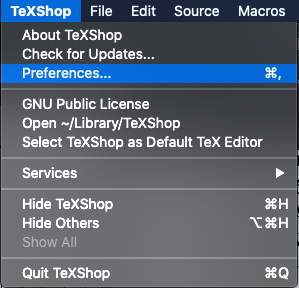
To change the dictionary, go to TeXShop -> Preferences.


Select Source -> Dictionary.


Select 'en' for American English. 


If it is already 'en', try select another option and quit TeXShop. Restart TeXShop again after you select 'en'. 

Final result:

Reference:

How to Change TeXShop dictionary to American English? (StackExchange) (The answers were a bit outdated.)

2021/08/25

在LaTex使用中文 How to show Chinese characters in LaTex

對於LaTex新手來說,使用中文可能會遇到一點小麻煩,不過其實並不困難,只要使用CJK套件,然後在中文的部分載入bsmi(明體)或bkai(楷書)字體即可。本文以Mac TeXShop環境為例:

LaTex程式碼:

\documentclass{article}

\usepackage{CJKutf8}

\begin{document}


The blog `StudyEECC' (\begin{CJK}{UTF8}{bsmi}電機、電子、通訊、電腦資訊工程的學習筆記\end{CJK}) was started in August 2016.


\vspace{\baselineskip}

\begin{CJK}{UTF8}{bkai}已經5年了!\end{CJK}


\end{document}


輸入後:


\end{document}

按Typeset鍵,執行結果如下:


以上程式可在IEEE格式 \documentclass{IEEEtran} 中執行

參考資料:

LaTex 的中文設定(陳鍾誠的網站)

2020/04/29

LaTex - Citation for web site in IEEEtran format 使用IEEE格式引用網址

1. Edit the bib file as:

@misc{studyswift_key,
Author = {E Huang},
Note = {[Online]. Available: \url{https://studyswift.blogspot.com/}, Accessed on: Apr. 29, 2020},
Title = {Study {Swift}}}

2. Add this to the tex file:

\usepackage{url}

3. Cite the website:

\cite{studyswift_key}

3. Typeset: LaTex -> BibTex -> LaTex -> LaTex

Result:

Reference:

LaTeX的BibTeX引用网页的办法

2020/04/23

LaTex - *.bib file - Preserve Capital Letters 保留大寫字母

LaTex 的bib檔中的英文大寫預設上是會自動轉換為小寫英文字母

若要保留大寫,在bib檔中的字母前後加上 { } 即可

原始參考文獻 (Before)

修改bib檔 (Modify *.bib file)


重新編譯後的參考文獻 (After)

參考資料

BibTeX loses capitals when creating .bbl file

2020/04/06

How to draw figures with mathematical font for LaTeX

How to create figures for LaTeX documents

1. Create figure with PowerPoint
2. Save as PDF file
3. Open the PDF file with Inkscape and save as EPS file.
4. Use LaTex to include the EPS file

How to include math labels with consistent font with LaTeX

1. Install Latin Modern Math font
2. Reboot the computer and select the font in PowerPoint.

3. Proceed the above steps and save the file as EPS.

Reference:
https://tex.stackexchange.com/questions/22454/what-is-the-name-of-the-default-font-in-math-mode