2026/10/24

本地端大語言模型中文能力簡單測試比較(llama3.2, gemma2:2b, gemma4:e2b, llama-3-taiwan-8b-instruct)

採用Intel CPU+Windows筆電實測比較一下本地端安裝的大型語言模型的中文能力,參加比賽的選手有llama3.2, gemma2:2b, gemma4:e2b, llama-3-taiwan-8b-instruct

 1. 安裝Ollama大語言模型管理工具

打開Windows PowerShell

執行

irm https://ollama.com/install.ps1 | iex

2. 檢查版本
ollama -v

> ollama -v

ollama version is 0.40.10

3. 安裝模型
在本實驗中,測試的開源大語言模型包括 llama3.2, gemma2:2b, gemma4:e2b, llama-3-taiwan-8b-instruct:latest

安裝指令如下
ollama run llama3.2
ollama run gemma2:2b
ollama run gemma4:e2b
ollama run cwchang/llama-3-taiwan-8b-instruct

4. 退出模型
/exit

5. 列出已安裝模型
ollama list

> ollama list

NAME                                         ID              SIZE      MODIFIED

cwchang/llama-3-taiwan-8b-instruct:latest    3f0396cc71cc    5.7 GB    4 minutes ago

gemma4:e2b                                   b37049369adf    4.6 GB    2 hours ago

gemma2:2b                                    8ccf136fdd52    1.6 GB    2 hours ago

llama3.2:latest                              a80c4f17acd5    2.0 GB    2 hours ago


6. 測試結果

llama3.2

回答快,但答案中有一些簡體字,英文字有拼錯,使用中英夾雜的方式有點怪


gemma2:2b

回答快,但答案中包含了好些簡體字


gemma4:e2b

前面的推論思考時間非常久,後面有正確使用正體中文回答,答案很長很完整


llama-3-taiwan-8b-instruct

針對正體中文微調過,回答速度表現好


2025/01/10

Check Points in Machine Learning

Q: What is the check point in machine learning & deep learning?

A: It is used to preserve the temporary models during training.

With the development of large language models (LLMs), models are becoming increasingly larger. As a result, research on utilizing model checkpoints has become important. Some machine learning experts are investigating methods to resume checkpoint models from interrupted training progress.

Checkpoint (檢查站/關口)在深度學習的領域,是指訓練過程中所保存的模型。

隨著大型語言模型(Large Language Model, LLM)的發展,現在的模型越來越大,因此Checkpoint的保留有其重要性,有學者在研究訓練中斷後如何重新從Checkpoint繼續先前未完成的訓練。


References:

Machine Learning Checkpoinging (deepchecks)

Resume Training from Checkpoint Network (Matlab)

Rojas, E., Kahira, A. N., Meneses, E., Gomez, L. B., & Badia, R. M. (2020). A study of checkpointing in large scale training of deep neural networks. arXiv preprint arXiv:2012.00825.

Xiang, L., Lu, X., Zhang, R., & Hu, Z. (2024, May). SSDC: A Scalable Sparse Differential Checkpoint for Large-scale Deep Recommendation Models. In 2024 IEEE International Symposium on Circuits and Systems (ISCAS) (pp. 1-5). IEEE.

2024/07/24

ChatGPT「雞兔同籠」解題

李宏毅老師的「80分鐘快速了解大型語言模型」課程影片中,示範了ChatGPT可以用來解「雞兔同籠」,於是來試試問它公元四世紀、1600年前的題目:


結果真的回答出來了!

參考資料:

80分鐘快速了解大型語言模型(1:04:05處)
【校園冷知識13】經典的「雞兔同籠」,原來是這個朝代的數學題!(親子天下)

2022/07/12

LaTex: Bibliography styles - IEEE, APA

 This post shows how to configure the bibliography style.

\documentclass{article}

\begin{document}


\textbf{Style: plain}


Deep learning is very important \cite{DL_book_goodfellow2016}.


\bibliographystyle{plain} 

\bibliography{my_bib}

\end{document}


Plain - plain


IEEE - ieeetr

ACE - acm

APA - apalike


APA - apalike + natbib

\documentclass{article}

\usepackage[square]{natbib}

\begin{document}


\textbf{Style: apalike natbib}


Deep learning is very important \cite{DL_book_goodfellow2016}.


\bibliographystyle{apalike} 


\bibliography{my_bib}

\end{document}


\documentclass{article}

\usepackage{natbib}

\begin{document}


\textbf{Style: apalike natbib}


\cite{DL_book_goodfellow2016} is a textbook in deep learning.


Deep learning is very important \citep{DL_book_goodfellow2016}.


Citation format citeauthor \citeauthor{DL_book_goodfellow2016}.


Citation format cite \cite{DL_HA_review_wang2017}.


Citation format citet \citet{DL_HA_review_wang2017}.


Citation format citep \citep{DL_HA_review_wang2017}.


\bibliographystyle{apalike} 


\bibliography{my_bib}

\end{document}


Result:


Reference:

2022/06/12

Arduino: Hello World for WeMos D1 WIFI UNO

 Here are the steps for the WeMos D1 WIFI UNO:


1.  Select File -> Preferences


2.  Settings -> Additional Boards Manager URLs: 

http://arduino.esp8266.com/stable/package_esp8266com_index.json


3. Tools -> Board: "Arduino Uno" -> Boards Manager

4. Enter WeMos and select Install for ESP8266.


5. Select "LOLIN(WeMos) D1 R1


6. Select COM port


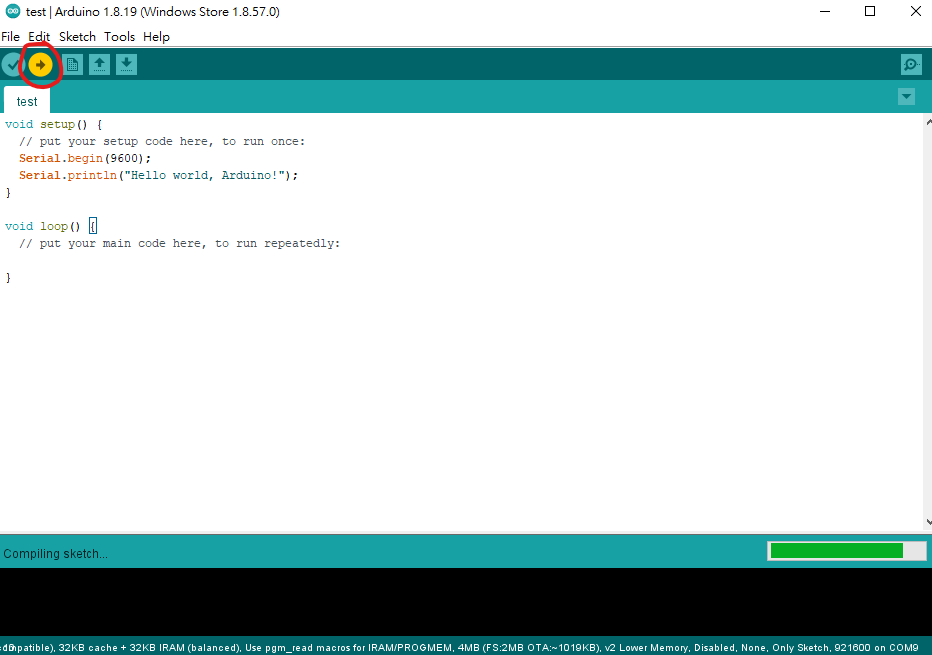
7. Write the simple code below and select the arrow to download

void setup() {
  // put your setup code here, to run once:
  Serial.begin(9600);
  Serial.println("Hello world, Arduino!");
}

void loop() {
  // put your main code here, to run repeatedly:
  
}


8. Select the Serial Monitor


9. You may see strange characters after you press the reset button.


10. Move the print line function into the loop. The strange characters only happen after pressing the reset button. So you may ignore them.

void setup() {
  // put your setup code here, to run once:
  Serial.begin(9600);

}

void loop() {
  // put your main code here, to run repeatedly:
  Serial.println("Hello world, Arduino!");  
  delay(1000);
}
 

Related information: 

2022/06/09

How to change the TeXShop spell check dictionary to American English?

TeXShop is a popular LaTex editor for macOS. If the spell check goes to the British English, you may see something like this:


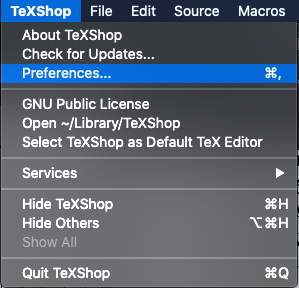
To change the dictionary, go to TeXShop -> Preferences.


Select Source -> Dictionary.


Select 'en' for American English. 


If it is already 'en', try select another option and quit TeXShop. Restart TeXShop again after you select 'en'. 

Final result:

Reference:

How to Change TeXShop dictionary to American English? (StackExchange) (The answers were a bit outdated.)

2022/05/02

Computational speed for PyTorch tensors using cuda().squeeze() and squeeze().cuda()

I am wondering which of the following codes in PyTorch work faster:

my_tensor.cuda().squeeze() vs. my_tensor.squeeze().cuda()


Check with the code:

time_start_vocoder = time.perf_counter()          

a = my_tensor.cuda().squeeze()


time_elapsed_test = (time.perf_counter() - time_start_vocoder)

print('a time=',time_elapsed_test)


time_start_vocoder = time.perf_counter()


b = my_tensor.squeeze().cuda()


print('b time=',time_elapsed_test)

Where

my_tensor.shape = torch.Size([1, a_large_number])

Result:

Run 1:

a time= 0.00013689976185560226

b time= 9.429734200239182e-05


Run 2:

a time= 0.0001775706186890602

b time= 0.00010665040463209152


Run 3:

a time= 0.0001584356650710106

b time= 6.485264748334885e-05


Swap the order of a and b in code:


Run 1:

b time= 0.0001363120973110199

a time= 0.00011534709483385086


Run 2:

b time= 0.00021496228873729706

a time= 7.021520286798477e-05


Run 3:

b time= 0.00020176637917757034

a time= 6.876792758703232e-05


Conclusion:


The execution time for my_tensor.cuda().squeeze() and my_tensor.squeeze().cuda() are similar, and my_tensor.cuda().squeeze() might be a little bit faster.