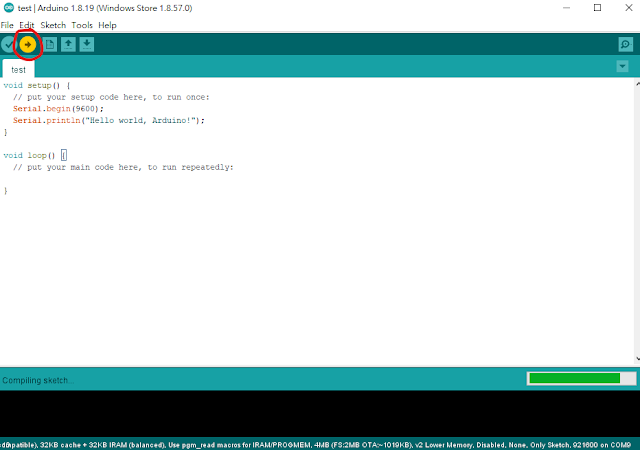
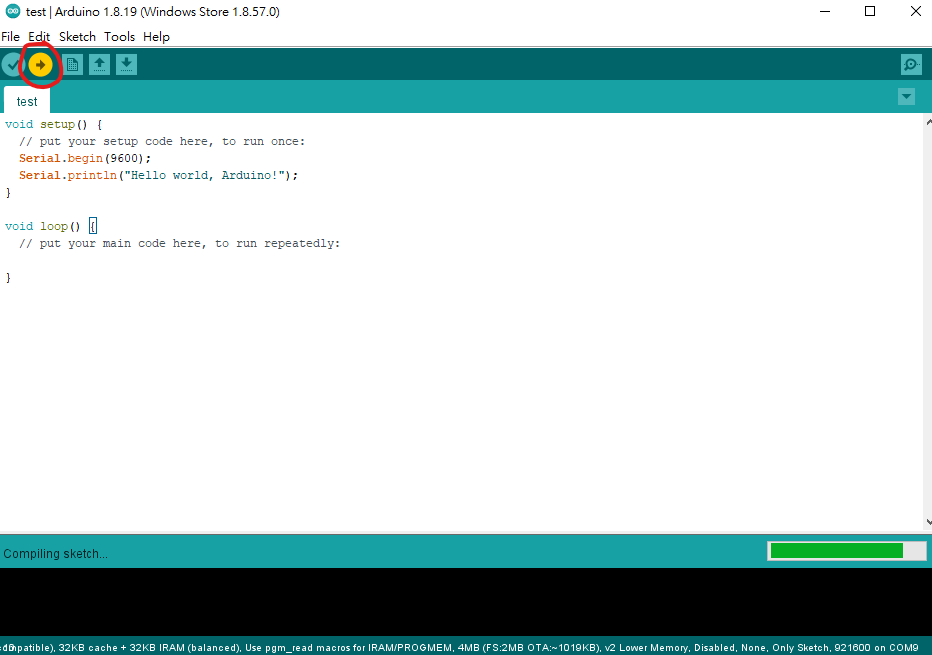
Here are the steps for the WeMos D1 WIFI UNO:
1. Select File -> Preferences
Information about Electrical, Electronic, Communication and Computer Engineering 電機、電子、通訊、電腦資訊工程的學習筆記
相關資訊~生醫工程:StudyBME
聽力科技相關資訊:電子耳資訊小站
iOS程式語言:Study Swift
樹莓派和Python:Study Raspberry Pi
Here are the steps for the WeMos D1 WIFI UNO:
1. Select File -> Preferences
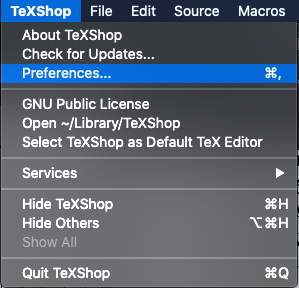
TeXShop is a popular LaTex editor for macOS. If the spell check goes to the British English, you may see something like this:
I am wondering which of the following codes in PyTorch work faster:
my_tensor.cuda().squeeze() vs. my_tensor.squeeze().cuda()
Check with the code:
time_start_vocoder = time.perf_counter()
a = my_tensor.cuda().squeeze()
time_elapsed_test = (time.perf_counter() - time_start_vocoder)
print('a time=',time_elapsed_test)
time_start_vocoder = time.perf_counter()
b = my_tensor.squeeze().cuda()
print('b time=',time_elapsed_test)
Where
my_tensor.shape = torch.Size([1, a_large_number])
Result:
Run 1:
a time= 0.00013689976185560226
b time= 9.429734200239182e-05
Run 2:
a time= 0.0001775706186890602
b time= 0.00010665040463209152
Run 3:
a time= 0.0001584356650710106
b time= 6.485264748334885e-05
Swap the order of a and b in code:
Run 1:
b time= 0.0001363120973110199
a time= 0.00011534709483385086
Run 2:
b time= 0.00021496228873729706
a time= 7.021520286798477e-05
Run 3:
b time= 0.00020176637917757034
a time= 6.876792758703232e-05
Conclusion:
The execution time for my_tensor.cuda().squeeze() and my_tensor.squeeze().cuda() are similar, and my_tensor.cuda().squeeze() might be a little bit faster.
There is no pi (π) function in PyTorch with some version, so some people suggested to use math.pi or np.pi for conversion into torch tensor. For me, torch.pi works with a notebook without the GPU, but not with a computer with the GPU.
Here is the code to compare different implementations of the Pi function.
import torch
import numpy as np
import time
import math
#test pi
time_start = time.perf_counter()
pi_math = torch.tensor(math.pi)
time_elapsed_test = (time.perf_counter() - time_start)
print('math pi time =',time_elapsed_test)
time_start = time.perf_counter()
pi_np = torch.tensor(np.pi)
time_elapsed_test = (time.perf_counter() - time_start)
print('np pi time =',time_elapsed_test)
time_start = time.perf_counter()
pi_torch = torch.pi
time_elapsed_test = (time.perf_counter() - time_start)
print('torch pi time =',time_elapsed_test)
time_start = time.perf_counter()
PI = torch.acos(torch.Tensor([-1]))
time_elapsed_test = (time.perf_counter() - time_start)
print('PI time =',time_elapsed_test)
Results for computation time:
math pi time = 3.6502000057225814e-05
np pi time = 1.9006000002264045e-05
torch pi time = 8.009999419300584e-07
PI time = 0.00035780000007434865
Hence torch.pi is the fastest.
Without torch.pi, you may use torch.tensor(np.pi)
For an accurate pi, cast the type to float64:
torch.tensor(np.pi, dtype=torch.float64)
Example:
(Pdb) torch.tensor(np.pi)*100000
tensor(314159.2812)
(Pdb) torch.tensor(np.pi, dtype=torch.float64)*100000
tensor(314159.2654, dtype=torch.float64)
MATLAB:
pi = 3.141592653589793
Reference:
Below shows an example using STFT to transform speech into the frequency domain and ISTFT to transform the spectral data back to waveforms in the time domain. The Librosa package is used.
import librosa
import soundfile as sf
x, sr = librosa.load('1.wav', sr=None)
n_fft = 256
hop_length = 128
win_length = 256
X = librosa.stft(x, n_fft=n_fft, hop_length=hop_length, win_length=win_length)
y = librosa.istft(X, n_fft=n_fft, hop_length=hop_length, win_length=win_length)
sf.write('1_istft.wav', y, 16000)
Results for x and y:
References:
Matlab: Short-Time Fourier Transform (STFT) and its inverse transform (ISTFT) (StudyEECC)
For sound processing in realtime scenarios, it is not possible to wait for a complete sound file. In this case, short-time processing is important.
Here is an example using STFT to transform speech into the frequency domain and inverse transform the spectral data back to waveforms in the time domain:
[S,F,T] = stft(x, fs,'Window',win2,'OverlapLength',128,'FFTLength',256);
[y,ti] = istft(S,fs,'Window',win2,'OverlapLength',128,'FFTLength',256);
References:
stft - Short-time Fourier transform (MathWorks)
istft - Inverse short-time Fourier transform (MathWorks)
The DCT and inverse DCT may be used to convert a speech signal into the transform domain using real values and back to the speech waveform.
Example with Matlab:
%load speech
load mtlb
x = mtlb;
X = dct(x);
y = idct(X);
Results:
>> isequal(x,y)
ans =
logical
0
For real-time processing, short-time DCT is required.
References:
Discrete Cosine Transform (Wikipedia)
dct (MathWorks)